Yep, we may get a tiny thank-you (read: commission) when you buy through
links on Gadgetspotr — not enough for a yacht, but enough to keep the lights (and
servers) on.
Learn more
30
Highlights
68
Differences
3
Reactions
0
Likes
iHealth Nexus
vs
Fitbit Aria:
30 Highlights & 68 Differences —
So, Which Smart Scale Actually Works Better
Discover which scale offers more features, better accuracy, and suits your lifestyle. Simple comparison for smarter health tracking.
Gadget showdown: iHealth Nexus vs Fitbit Aria — see how they match up in performance, features, and user data control options, regulatory compliance, package depth & indicator icons.
iHealth Nexus vs Fitbit Aria: A Comprehensive Smart Scale Comparison
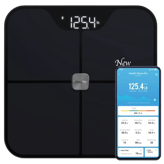
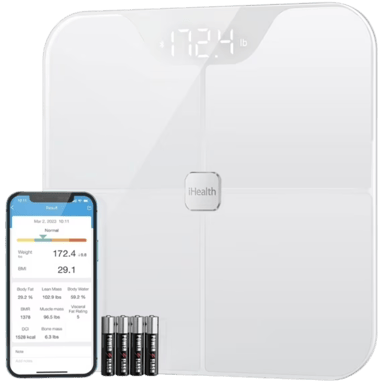
When it comes to choosing a smart scale capable of tracking your health metrics effectively, both the iHealth Nexus and the Fitbit Aria stand out as popular Bluetooth smart scales designed for home use. They share core features such as Bluetooth connectivity, automatic user recognition for up to eight profiles, and integration with health apps to help users track trends over time. However, fundamental differences emerge in the range and depth of body composition metrics, device design, and ecosystem compatibility. The iHealth Nexus targets users looking for an all-in-one solution with extensive health insights, like heart rate and metabolic age, offered via its capacitive touch LED display and multilingual interface. Meanwhile, the Fitbit Aria focuses more on straightforward weight and body fat monitoring with an LCD and is tailored specifically for Fitbit app users.
Why the iHealth Nexus Shines as a Health Powerhouse
The iHealth Nexus takes smart health tracking to a new level by providing rich body composition data that goes well beyond weight and BMI. It delivers accurate assessments of heart rate, basal metabolic rate, visceral fat level, muscle and bone mass, protein percentage, and even metabolic age. This detail is supported by its use of four bioelectrical impedance sensors combined with load cell pressure sensors, employing motion filtering technology for stable readings. Additionally, it features environmental drift compensation, which means it adjusts to different surroundings, improving performance consistency in places like the bathroom or bedroom.
In terms of build, the Nexus boasts a matte finish with rubberized foot grips and anti-slip feet to provide enhanced stability during use; features missing from the Fitbit Aria. Its 3-inch LED screen supports capacitive touch controls, offering a sleek, modern user experience with multilingual support covering English, Spanish, French, and German.
Battery life is another advantage, powered by AAA batteries optimized for long use with features such as low battery indicators and automatic power-off functions, ensuring energy efficiency. The scale excels in user profile management too, supporting child and guest modes along with long-term data retention and easy data export. Plus, it integrates broadly with multiple health ecosystems, including Google Fit, Fitbit, and Apple Health, suitable for users who prefer multi-platform syncing. Priced competitively at about $29.99 at Amazon, it delivers excellent value.
What Defines Fitbit Aria's Standing in the Market
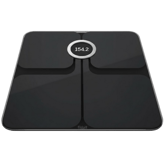
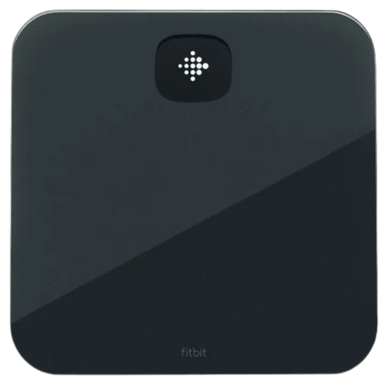
Despite its older release year, 2011, compared to the Nexus's 202, the Fitbit Aria remains relevant, especially for Fitbit users who want seamless integration with the Fitbit app. Its smart scale type uses a combination of strain gauge and bioelectrical impedance sensors, enabling basic weight and body fat percentage tracking along with BMI. Although it doesn't measure muscle mass, bone mass, or heart rate, it still provides reliable automatic user recognition with high accuracy for profile switching. The device also supports Wi-Fi connectivity alongside Bluetooth, which can be useful for cloud syncing directly without a smartphone intermediary.
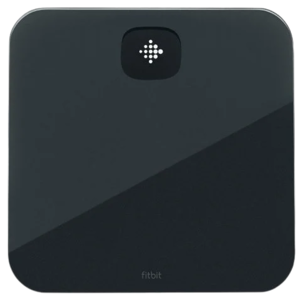
Design-wise, the Aria features a glossy tempered glass platform and rounded edges, but lacks foot grips, reducing stability on certain surfaces. Its 2-inch LCD with physical button controls offers a straightforward interface, limited to English language support.
While the Aria has a moderate battery life supported by AAA batteries and includes common features like auto power-off and low battery alerts, it lacks modern energy efficiency and environmental compensation that newer models offer. Maintenance demands are low, with no firmware updates required, although a 1-year warranty supports the product.
The scale suits a more limited audience; those who prioritize weight and BMI tracking linked to the Fitbit ecosystem. Though its maximum user weight capacity is slightly less at 350 lbs, it remains practical for general adult use in home settings. Price-wise, it is available for around $49.95 at Abt, which is noticeably higher than the Nexus.
Quick Snapshot
The iHealth Nexus impresses with comprehensive body composition analysis, multi-interface support, and longer battery life at a budget-friendly price point. Conversely, the Fitbit Aria stays focused on simple, reliable weight and fat tracking within the Fitbit ecosystem, appealing most to users already using Fitbit products.
Bottom Line
For those who want an all-encompassing health monitoring experience with advanced metrics and a sleek, modern design, the iHealth Nexus is the clear winner. It provides superior accuracy, more detailed body insights, enhanced durability, and multilingual support for a better user experience. However, if you are deeply embedded in the Fitbit ecosystem and need a solid, no-frills scale for weight and BMI with Wi-Fi support, the Fitbit Aria remains a competent choice.
Verdict
Winner: iHealth Nexus - for its broad health metric coverage, better accuracy, user-friendly design, and excellent value.
Runner-up: Fitbit Aria - ideal for Fitbit app users wanting simple weight and BMI tracking with reliable auto-recognition.
0
iHealth Nexus
0Votes
Bathroom, Bedroom, Home Gym
0
Fitbit Aria
0Votes
Bathroom, Bedroom
vs
Environment Suitability
iHealth Nexus suits Bathroom, Bedroom, and Home Gym environments, compared to Fitbit Aria which is suitable for Bathroom and Bedroom, making iHealth Nexus more versatile environment-wise.
Indicates suitable environments for safe and effective use.
In the battle of Environment Suitability,
iHealth Nexus ◉ is
same as
Fitbit Aria ◉
.
Don’t keep it to yourself — be the first to react and review the
Environment Suitability on iHealth Nexus ◉
vs Fitbit Aria ◉ and help others decide!
Intended Measurement Purpose
What measurements is this smart scale intended to provide?
0
iHealth Nexus
0Votes
Full Body Metrics
0
Fitbit Aria
0Votes
Weight Only, Full Body Metrics
vs
Intended Measurement Purpose
The iHealth Nexus has an Intended Measurement Purpose of Full Body Metrics, while Fitbit Aria also includes Weight Only.
Defines the scope of measurements provided.
In the battle of Intended Measurement Purpose,
iHealth Nexus ◉ is
same as
Fitbit Aria ◉
.
Don’t keep it to yourself — be the first to react and review the
Intended Measurement Purpose on iHealth Nexus ◉
vs Fitbit Aria ◉ and help others decide!
Intended Use Case
What is the main use case of this smart scale?
0
iHealth Nexus
0Votes
Body Composition Tracking, Weight Tracking
0
Fitbit Aria
0Votes
Weight Tracking, Body Composition Tracking, Fitness Monitoring, Health Monitoring
vs
Intended Use Case
iHealth Nexus is designed for Body Composition Tracking and Weight Tracking, whereas Fitbit Aria is intended for Weight Tracking, Body Composition Tracking, Fitness Monitoring, and Health Monitoring.
Explains the main purpose of the smart scale.
In the battle of Intended Use Case,
iHealth Nexus ◉ is
same as
Fitbit Aria ◉
.
Don’t keep it to yourself — be the first to react and review the
Intended Use Case on iHealth Nexus ◉
vs Fitbit Aria ◉ and help others decide!
Target User
Who is this smart scale designed for?
0
iHealth Nexus
0Votes
Family, General Adult
0
Fitbit Aria
0Votes
General Adult
vs
Target User
iHealth Nexus targets Family and General Adult users, while Fitbit Aria targets General Adult users only, making the former more versatile for multiple users.
Describes the primary intended user group.
In the battle of Target User,
iHealth Nexus ◉ is
same as
Fitbit Aria ◉
.
Don’t keep it to yourself — be the first to react and review the
Target User on iHealth Nexus ◉
vs Fitbit Aria ◉ and help others decide!
App Required
Is an app required to use this smart scale?
Yes
0Votes
iHealth Nexus
Yes
0Votes
Fitbit Aria
vs
App Required
Both products require an App to function.
Indicates whether an app is mandatory for use.
In the battle of App Required,
iHealth Nexus ◉ is
same as
Fitbit Aria ◉
.
Don’t keep it to yourself — be the first to react and review the
App Required on iHealth Nexus ◉
vs Fitbit Aria ◉ and help others decide!
Smart Scale Type
What type of smart scale is this?
0
iHealth Nexus
0Votes
Bluetooth Smart Scale
0
Fitbit Aria
0Votes
Bluetooth Smart Scale
vs
Smart Scale Type
Both iHealth Nexus and Fitbit Aria feature a Smart Scale Type of Bluetooth Smart Scale.
Indicates how the smart scale connects and operates.
In the battle of Smart Scale Type,
iHealth Nexus ◉ is
same as
Fitbit Aria ◉
.
Don’t keep it to yourself — be the first to react and review the
Smart Scale Type on iHealth Nexus ◉
vs Fitbit Aria ◉ and help others decide!
User Skill Level
What user skill level is this smart scale designed for?
0
iHealth Nexus
0Votes
Beginner
0
Fitbit Aria
0Votes
Beginner
vs
User Skill Level
Both products cater to Beginner User Skill Levels.
Indicates how easy the scale is to use.
In the battle of User Skill Level,
iHealth Nexus ◉ is
same as
Fitbit Aria ◉
.
Don’t keep it to yourself — be the first to react and review the
User Skill Level on iHealth Nexus ◉
vs Fitbit Aria ◉ and help others decide!
Release Year
What year was this smart scale released?
0
iHealth Nexus
0Votes
2022
0
Fitbit Aria
0Votes
2011
vs
Release Year
iHealth Nexus was released in 2022, whereas Fitbit Aria was released earlier in 2011, reflecting iHealth Nexus as the newer model.
Shows how recent the product generation is.
In the battle of Release Year,
iHealth Nexus ◉ is
same as
Fitbit Aria ◉
.
Don’t keep it to yourself — be the first to react and review the
Release Year on iHealth Nexus ◉
vs Fitbit Aria ◉ and help others decide!
Subscription Required
Is a subscription required to use all features?
No
0Votes
iHealth Nexus
No
0Votes
Fitbit Aria
vs
Subscription Required
Subscription Required for the iHealth Nexus is not applicable, while Fitbit Aria does not require a subscription.
Shows whether a paid subscription is needed for full functionality.
In the battle of Subscription Required,
iHealth Nexus ◉ is
same as
Fitbit Aria ◉
.
Don’t keep it to yourself — be the first to react and review the
Subscription Required on iHealth Nexus ◉
vs Fitbit Aria ◉ and help others decide!
Who knows?
0Votes
iHealth Nexus
(Help us out by suggesting one!)
Who knows?
0Votes
Fitbit Aria
(Help us out by suggesting one!)
Depth of the retail packaging.
Don’t keep it to yourself — be the first to react and review the
Package Depth on iHealth Nexus ◉
vs Fitbit Aria ◉ and help others decide!
Depth
What is the depth of the smart scale?
12.04
inch
0Votes
11.8
inch
0Votes
vs
Depth
Depth of iHealth Nexus is 12.04 inches (30.59 cm), marginally deeper than Fitbit Aria's 11.8 inches (29.97 cm).
Measures the front-to-back size of the scale.
In the battle of Depth,
iHealth Nexus ◉ is
worse than
Fitbit Aria ◉
, delivering
higher
0.2 inch
measurement.
Don’t keep it to yourself — be the first to react and review the
Depth on iHealth Nexus ◉
vs Fitbit Aria ◉ and help others decide!
Product Weight
How much does the smart scale weigh?
4.08
lbs
0Votes
Who knows?
0Votes
Fitbit Aria
(Help us out by suggesting one!)
vs
Product Weight
Product Weight is 4.08 lbs (1.85 kg) for iHealth Nexus, while Fitbit Aria's is not available, leaving weight advantage unclear.
Weight of the smart scale itself.
Don’t keep it to yourself — be the first to react and review the
Product Weight on iHealth Nexus ◉
vs Fitbit Aria ◉ and help others decide!
Maximum User Weight Capacity
What is the maximum supported user weight?
400
lbs
0Votes
350
lbs
0Votes
vs
Maximum User Weight Capacity
The Maximum User Weight Capacity for iHealth Nexus is 400 lbs, compared to Fitbit Aria's 350 lbs.
Maximum supported user weight for safe operation.
In the battle of Maximum User Weight Capacity,
iHealth Nexus ◉ is
better than
Fitbit Aria ◉
, delivering
higher
50.0 lbs
measurement.
Don’t keep it to yourself — be the first to react and review the
Maximum User Weight Capacity on iHealth Nexus ◉
vs Fitbit Aria ◉ and help others decide!
Width
What is the width of the smart scale?
12.04
inch
0Votes
11.8
inch
0Votes
vs
Width
The Width of iHealth Nexus is 12.04 inches, while Fitbit Aria measures 11.8 inches.
Indicates the left-to-right size of the scale footprint.
In the battle of Width,
iHealth Nexus ◉ is
worse than
Fitbit Aria ◉
, delivering
higher
0.2 inch
measurement.
Don’t keep it to yourself — be the first to react and review the
Width on iHealth Nexus ◉
vs Fitbit Aria ◉ and help others decide!
Height
What is the height of the smart scale?
1.05
inch
0Votes
1
inch
0Votes
vs
Height
The Height of iHealth Nexus is 1.05 inches, while Fitbit Aria stands at 1 inch.
Shows how tall the scale sits off the floor.
In the battle of Height,
iHealth Nexus ◉ is
worse than
Fitbit Aria ◉
, delivering
higher
0.1 inch
measurement.
Don’t keep it to yourself — be the first to react and review the
Height on iHealth Nexus ◉
vs Fitbit Aria ◉ and help others decide!
Package Width
What is the package width?
Who knows?
0Votes
iHealth Nexus
(Help us out by suggesting one!)
Who knows?
0Votes
Fitbit Aria
(Help us out by suggesting one!)
Width of the retail packaging.
Don’t keep it to yourself — be the first to react and review the
Package Width on iHealth Nexus ◉
vs Fitbit Aria ◉ and help others decide!
Package Height
What is the package height?
Who knows?
0Votes
iHealth Nexus
(Help us out by suggesting one!)
Who knows?
0Votes
Fitbit Aria
(Help us out by suggesting one!)
Height of the retail packaging.
Don’t keep it to yourself — be the first to react and review the
Package Height on iHealth Nexus ◉
vs Fitbit Aria ◉ and help others decide!
Package Weight
What is the package weight?
Who knows?
0Votes
iHealth Nexus
(Help us out by suggesting one!)
Who knows?
0Votes
Fitbit Aria
(Help us out by suggesting one!)
Total shipping weight including packaging.
Don’t keep it to yourself — be the first to react and review the
Package Weight on iHealth Nexus ◉
vs Fitbit Aria ◉ and help others decide!
Measurement Start Method is Step-On for both devices, allowing quick, easy measurements.
Describes how measurements are initiated.
In the battle of Measurement Start Method,
iHealth Nexus ◉ is
same as
Fitbit Aria ◉
.
Don’t keep it to yourself — be the first to react and review the
Measurement Start Method on iHealth Nexus ◉
vs Fitbit Aria ◉ and help others decide!
Pressure Sensor Technology
What pressure sensor technology is used?
0
iHealth Nexus
0Votes
Load Cell
0
Fitbit Aria
0Votes
Load Cell
iHealth Nexus
The scale uses Load Cell technology for its pressure sensors, known for providing accurate and reliable weight measurements.
Describes how weight pressure is detected.
In the battle of Pressure Sensor Technology,
iHealth Nexus ◉ is
same as
Fitbit Aria ◉
.
Don’t keep it to yourself — be the first to react and review the
Pressure Sensor Technology on iHealth Nexus ◉
vs Fitbit Aria ◉ and help others decide!
Auto-Calibration
Does the scale support auto-calibration?
Yes
0Votes
iHealth Nexus
Yes
0Votes
Fitbit Aria
vs
Auto-Calibration
Auto-Calibration is supported by both iHealth Nexus and Fitbit Aria, simplifying user experience.
Indicates whether the scale self-calibrates automatically.
In the battle of Auto-Calibration,
iHealth Nexus ◉ is
same as
Fitbit Aria ◉
.
Don’t keep it to yourself — be the first to react and review the
Auto-Calibration on iHealth Nexus ◉
vs Fitbit Aria ◉ and help others decide!
In the battle of Sensor Type,
iHealth Nexus ◉ is
same as
Fitbit Aria ◉
.
Don’t keep it to yourself — be the first to react and review the
Sensor Type on iHealth Nexus ◉
vs Fitbit Aria ◉ and help others decide!
Bioelectrical Impedance
Does the scale support bioelectrical impedance?
Yes
0Votes
iHealth Nexus
Yes
0Votes
Fitbit Aria
Indicates support for body composition measurement via impedance.
In the battle of Bioelectrical Impedance,
iHealth Nexus ◉ is
same as
Fitbit Aria ◉
.
Don’t keep it to yourself — be the first to react and review the
Bioelectrical Impedance on iHealth Nexus ◉
vs Fitbit Aria ◉ and help others decide!
Electrode Material
What material are the electrodes made from?
0
iHealth Nexus
0Votes
ITO Coating
0
Fitbit Aria
0Votes
ITO Coating
Specifies the material used for impedance electrodes.
In the battle of Electrode Material,
iHealth Nexus ◉ is
same as
Fitbit Aria ◉
.
Don’t keep it to yourself — be the first to react and review the
Electrode Material on iHealth Nexus ◉
vs Fitbit Aria ◉ and help others decide!
Measurement Sampling Rate
What is the measurement sampling rate?
2
Hz
0Votes
1
Hz
0Votes
vs
Measurement Sampling Rate
Measurement Sampling Rate is 2 Hz for iHealth Nexus and 1 Hz for Fitbit Aria, meaning iHealth Nexus samples data twice as fast.
Frequency at which sensor data is sampled.
In the battle of Measurement Sampling Rate,
iHealth Nexus ◉ is
better than
Fitbit Aria ◉
, delivering
higher
1.0 Hz
measurement.
Don’t keep it to yourself — be the first to react and review the
Measurement Sampling Rate on iHealth Nexus ◉
vs Fitbit Aria ◉ and help others decide!
Signal Stability Technology
How does the scale stabilize sensor signals?
0
iHealth Nexus
0Votes
Motion Filtering
0
Fitbit Aria
0Votes
Motion Filtering
vs
Signal Stability Technology
Signal Stability Technology is Motion Filtering on both products, helping reduce measurement noise.
Describes methods used to stabilize readings.
In the battle of Signal Stability Technology,
iHealth Nexus ◉ is
same as
Fitbit Aria ◉
.
Don’t keep it to yourself — be the first to react and review the
Signal Stability Technology on iHealth Nexus ◉
vs Fitbit Aria ◉ and help others decide!
Sensor Lifespan Rating
How long is the sensor lifespan expected to last?
0
iHealth Nexus
0Votes
Moderate
0
Fitbit Aria
0Votes
Moderate
vs
Sensor Lifespan Rating
Sensor Lifespan Rating is Moderate for both, indicating similar durability.
Describes the expected durability and operational lifespan of the internal sensors under normal usage conditions.
In the battle of Sensor Lifespan Rating,
iHealth Nexus ◉ is
same as
Fitbit Aria ◉
.
Don’t keep it to yourself — be the first to react and review the
Sensor Lifespan Rating on iHealth Nexus ◉
vs Fitbit Aria ◉ and help others decide!
Does the scale show measurement confidence indicators?
Yes
0Votes
iHealth Nexus
No
0Votes
Fitbit Aria
iHealth Nexus
A measurement confidence indicator is present, providing reassurance about the reliability of the readings displayed.
Indicates whether the scale shows confidence or validation cues.
In the battle of Measurement Confidence Indicator,
iHealth Nexus ◉ is
better than
Fitbit Aria ◉
.
Don’t keep it to yourself — be the first to react and review the
Measurement Confidence Indicator on iHealth Nexus ◉
vs Fitbit Aria ◉ and help others decide!
Describes how reliably the smart scale can automatically identify the correct user profile based on measurement data.
In the battle of Auto User Recognition Accuracy,
iHealth Nexus ◉ is
same as
Fitbit Aria ◉
.
Don’t keep it to yourself — be the first to react and review the
Auto User Recognition Accuracy on iHealth Nexus ◉
vs Fitbit Aria ◉ and help others decide!
Measurement Resolution
What is the measurement resolution?
0.1
lbs
0Votes
0.2
lbs
0Votes
iHealth Nexus
The scale offers a fine measurement resolution of 0.1 lbs (0.05 kg), allowing for precise tracking of weight changes.
Fitbit Aria
The scale provides a fine measurement resolution of 0.2 lbs (0.09 kg), allowing for precise tracking of even small changes in weight.
Smallest detectable change in measurement value.
In the battle of Measurement Resolution,
iHealth Nexus ◉ is
better than
Fitbit Aria ◉
, delivering
lower
0.1 lbs
measurement.
Don’t keep it to yourself — be the first to react and review the
Measurement Resolution on iHealth Nexus ◉
vs Fitbit Aria ◉ and help others decide!
Stabilization Time
How long does stabilization take?
6
second
0Votes
3
second
1Votes
Fitbit Aria
It takes approximately 3 second for the scale to stabilize and provide an accurate reading once you step on it.
Time required for readings to stabilize.
In the battle of Stabilization Time,
iHealth Nexus ◉ is
worse than
Fitbit Aria ◉
, delivering
higher
3.0 second
measurement.
Based on community votes for Stabilization Time,
iHealth Nexus ◉ earned
0 votes,
less than
Fitbit Aria ◉,
which got 1 votes.
Fitbit Aria stabilizes faster in just 3 seconds compared to 6 on the Nexus so if you want quick readings go for Aria.
See more
Performance Consistency Rating
How consistent is overall performance?
0
iHealth Nexus
0Votes
Good
0
Fitbit Aria
0Votes
Good
vs
Performance Consistency Rating
Both provide Good Performance Consistency Rating.
Overall consistency rating across conditions.
In the battle of Performance Consistency Rating,
iHealth Nexus ◉ is
same as
Fitbit Aria ◉
.
Don’t keep it to yourself — be the first to react and review the
Performance Consistency Rating on iHealth Nexus ◉
vs Fitbit Aria ◉ and help others decide!
Weight Measurement Accuracy
How accurate is the weight measurement?
0
iHealth Nexus
0Votes
High
0
Fitbit Aria
0Votes
Medium
Describes the overall accuracy level of weight measurements rather than a numeric margin.
In the battle of Weight Measurement Accuracy,
iHealth Nexus ◉ is
same as
Fitbit Aria ◉
.
Don’t keep it to yourself — be the first to react and review the
Weight Measurement Accuracy on iHealth Nexus ◉
vs Fitbit Aria ◉ and help others decide!
Body Fat Accuracy
How accurate is the body fat measurement?
0
iHealth Nexus
0Votes
Medium
0
Fitbit Aria
0Votes
Low
vs
Body Fat Accuracy
Body Fat Accuracy is Medium in iHealth Nexus and Low in Fitbit Aria, meaning iHealth Nexus has better body fat measurement reliability.
Indicates the overall reliability level of body fat percentage estimation provided by the smart scale.
In the battle of Body Fat Accuracy,
iHealth Nexus ◉ is
same as
Fitbit Aria ◉
.
Don’t keep it to yourself — be the first to react and review the
Body Fat Accuracy on iHealth Nexus ◉
vs Fitbit Aria ◉ and help others decide!
Repeatability Consistency
How consistent are repeated measurements?
0
iHealth Nexus
0Votes
High
0
Fitbit Aria
0Votes
Moderate
Indicates consistency across repeated measurements.
In the battle of Repeatability Consistency,
iHealth Nexus ◉ is
same as
Fitbit Aria ◉
.
Don’t keep it to yourself — be the first to react and review the
Repeatability Consistency on iHealth Nexus ◉
vs Fitbit Aria ◉ and help others decide!
Error Margin Disclosure
Is the error margin disclosed?
Yes
0Votes
iHealth Nexus
No
0Votes
Fitbit Aria
Indicates whether accuracy margins are disclosed by the manufacturer.
In the battle of Error Margin Disclosure,
iHealth Nexus ◉ is
better than
Fitbit Aria ◉
.
Don’t keep it to yourself — be the first to react and review the
Error Margin Disclosure on iHealth Nexus ◉
vs Fitbit Aria ◉ and help others decide!
Environmental Drift Compensation
Does the scale compensate for environmental drift?
Yes
0Votes
iHealth Nexus
No
0Votes
Fitbit Aria
vs
Environmental Drift Compensation
Environmental Drift Compensation is supported by iHealth Nexus but missing on Fitbit Aria, making iHealth Nexus more stable under varying conditions.
Indicates compensation for temperature or surface changes.
In the battle of Environmental Drift Compensation,
iHealth Nexus ◉ is
better than
Fitbit Aria ◉
.
Don’t keep it to yourself — be the first to react and review the
Environmental Drift Compensation on iHealth Nexus ◉
vs Fitbit Aria ◉ and help others decide!
What wireless connectivity does the scale support?
0
iHealth Nexus
0Votes
Bluetooth
0
Fitbit Aria
0Votes
Bluetooth
Defines the wireless technologies used for data transfer.
In the battle of Wireless Connectivity Type,
iHealth Nexus ◉ is
same as
Fitbit Aria ◉
.
Don’t keep it to yourself — be the first to react and review the
Wireless Connectivity Type on iHealth Nexus ◉
vs Fitbit Aria ◉ and help others decide!
Smart Home Integration is not present on iHealth Nexus and Fitbit Aria supports no smart home integrations, so equally limited.
Indicates whether the scale integrates with smart home systems.
In the battle of Smart Home Integration,
iHealth Nexus ◉ is
same as
Fitbit Aria ◉
.
Don’t keep it to yourself — be the first to react and review the
Smart Home Integration on iHealth Nexus ◉
vs Fitbit Aria ◉ and help others decide!
Cloud Sync
Does the scale support cloud sync?
Yes
0Votes
iHealth Nexus
Yes
0Votes
Fitbit Aria
iHealth Nexus
Cloud synchronization is enabled, allowing your health data to be securely stored and accessed from anywhere.
Fitbit Aria
Data can be synchronized to the cloud, providing secure storage and accessibility from various devices.
Indicates whether data is backed up to the cloud.
In the battle of Cloud Sync,
iHealth Nexus ◉ is
same as
Fitbit Aria ◉
.
Don’t keep it to yourself — be the first to react and review the
Cloud Sync on iHealth Nexus ◉
vs Fitbit Aria ◉ and help others decide!
Offline Measurement Storage
Can the scale store data offline?
Yes
0Votes
iHealth Nexus
Yes
0Votes
Fitbit Aria
iHealth Nexus
The scale can store measurements offline, ensuring data is not lost even when not connected to the app or internet.
Fitbit Aria
The scale can store measurements offline, allowing data to be collected even when not connected to the app or Wi-Fi, and then synced later.
Indicates whether measurements are stored without connectivity.
In the battle of Offline Measurement Storage,
iHealth Nexus ◉ is
same as
Fitbit Aria ◉
.
Don’t keep it to yourself — be the first to react and review the
Offline Measurement Storage on iHealth Nexus ◉
vs Fitbit Aria ◉ and help others decide!
App Name
What is the name of the companion app?
0
iHealth Nexus
0Votes
iHealth MyVitals
0
Fitbit Aria
0Votes
Fitbit
vs
App Name
App Name for iHealth Nexus is iHealth MyVitals, while Fitbit Aria uses Fitbit app, relevant for app ecosystem preferences.
Identifies the companion mobile application.
In the battle of App Name,
iHealth Nexus ◉ is
same as
Fitbit Aria ◉
.
Don’t keep it to yourself — be the first to react and review the
App Name on iHealth Nexus ◉
vs Fitbit Aria ◉ and help others decide!
Real-Time Sync
Does the scale support real-time syncing?
Yes
0Votes
iHealth Nexus
Yes
0Votes
Fitbit Aria
Fitbit Aria
Real-time synchronization is supported, allowing immediate transfer of measurement data to the connected app.
Indicates whether data syncs immediately after measurement.
In the battle of Real-Time Sync,
iHealth Nexus ◉ is
same as
Fitbit Aria ◉
.
Don’t keep it to yourself — be the first to react and review the
Real-Time Sync on iHealth Nexus ◉
vs Fitbit Aria ◉ and help others decide!
Data Sync Speed
How fast does data sync to the app?
0
iHealth Nexus
0Votes
Fast
0
Fitbit Aria
0Votes
Moderate
Fitbit Aria
The scale offers a Moderate data sync speed, balancing efficiency with battery life.
Describes how quickly data syncs to the app.
In the battle of Data Sync Speed,
iHealth Nexus ◉ is
same as
Fitbit Aria ◉
.
Don’t keep it to yourself — be the first to react and review the
Data Sync Speed on iHealth Nexus ◉
vs Fitbit Aria ◉ and help others decide!
Firmware Update Method
How are firmware updates applied?
0
iHealth Nexus
0Votes
App-Based
0
Fitbit Aria
0Votes
App-Based
iHealth Nexus
Firmware updates are performed via an App-Based method, making it convenient to keep the device software current.
Describes how firmware updates are delivered.
In the battle of Firmware Update Method,
iHealth Nexus ◉ is
same as
Fitbit Aria ◉
.
Don’t keep it to yourself — be the first to react and review the
Firmware Update Method on iHealth Nexus ◉
vs Fitbit Aria ◉ and help others decide!
Multi-Device Sync
Can data sync across multiple devices?
Yes
0Votes
iHealth Nexus
Yes
0Votes
Fitbit Aria
Fitbit Aria
The scale supports multi-device synchronization, allowing data to be viewed and managed across various connected devices.
Indicates whether data syncs across multiple devices.
In the battle of Multi-Device Sync,
iHealth Nexus ◉ is
same as
Fitbit Aria ◉
.
Don’t keep it to yourself — be the first to react and review the
Multi-Device Sync on iHealth Nexus ◉
vs Fitbit Aria ◉ and help others decide!
Wi-Fi Connectivity
Does the scale support Wi-Fi?
No
0Votes
iHealth Nexus
Yes
0Votes
Fitbit Aria
Indicates whether the scale can connect directly to Wi-Fi.
In the battle of Wi-Fi Connectivity,
iHealth Nexus ◉ is
worse than
Fitbit Aria ◉
.
Don’t keep it to yourself — be the first to react and review the
Wi-Fi Connectivity on iHealth Nexus ◉
vs Fitbit Aria ◉ and help others decide!
Battery Capacity is Medium on both, signaling comparable expected battery life.
Indicates the relative energy storage capacity of the battery rather than a numeric value.
In the battle of Battery Capacity,
iHealth Nexus ◉ is
same as
Fitbit Aria ◉
.
Don’t keep it to yourself — be the first to react and review the
Battery Capacity on iHealth Nexus ◉
vs Fitbit Aria ◉ and help others decide!
Power Source Type
What is the power source type?
0
iHealth Nexus
0Votes
Battery
0
Fitbit Aria
0Votes
Battery
Fitbit Aria
The scale uses a Battery as its power source, typically disposable AAA or AA batteries.
Defines how the smart scale is powered.
In the battle of Power Source Type,
iHealth Nexus ◉ is
same as
Fitbit Aria ◉
.
Don’t keep it to yourself — be the first to react and review the
Power Source Type on iHealth Nexus ◉
vs Fitbit Aria ◉ and help others decide!
Battery Life
How long does the battery last?
0
iHealth Nexus
0Votes
Long
0
Fitbit Aria
0Votes
Moderate
iHealth Nexus
The device offers Long battery life, reducing the frequency of battery replacements or recharges.
Describes how long the smart scale can operate before requiring battery replacement or recharging.
In the battle of Battery Life,
iHealth Nexus ◉ is
same as
Fitbit Aria ◉
.
Don’t keep it to yourself — be the first to react and review the
Battery Life on iHealth Nexus ◉
vs Fitbit Aria ◉ and help others decide!
Standby Power Consumption
How much power is used in standby?
0.5
Watt
0Votes
Who knows?
0Votes
Fitbit Aria
(Help us out by suggesting one!)
iHealth Nexus
In standby mode, the scale consumes a minimal 0.5 Watt of power, helping to extend battery life.
Power usage while idle or in standby mode.
Don’t keep it to yourself — be the first to react and review the
Standby Power Consumption on iHealth Nexus ◉
vs Fitbit Aria ◉ and help others decide!
Charging Method
How is the scale charged?
Who knows?
0Votes
iHealth Nexus
(Help us out by suggesting one!)
Who knows?
0Votes
Fitbit Aria
(Help us out by suggesting one!)
Describes how the battery is recharged.
Don’t keep it to yourself — be the first to react and review the
Charging Method on iHealth Nexus ◉
vs Fitbit Aria ◉ and help others decide!
Charging Time
How long does it take to charge?
Who knows?
0Votes
iHealth Nexus
(Help us out by suggesting one!)
Who knows?
0Votes
Fitbit Aria
(Help us out by suggesting one!)
Time required to fully charge the battery.
Don’t keep it to yourself — be the first to react and review the
Charging Time on iHealth Nexus ◉
vs Fitbit Aria ◉ and help others decide!
Low Battery Indicator
Does the scale show a low battery warning?
Yes
0Votes
iHealth Nexus
Yes
0Votes
Fitbit Aria
Indicates whether a low battery warning is provided.
In the battle of Low Battery Indicator,
iHealth Nexus ◉ is
same as
Fitbit Aria ◉
.
Don’t keep it to yourself — be the first to react and review the
Low Battery Indicator on iHealth Nexus ◉
vs Fitbit Aria ◉ and help others decide!
Power Efficiency Rating
How efficient is the scale’s power usage?
0
iHealth Nexus
0Votes
High
0
Fitbit Aria
0Votes
Medium
Overall efficiency of power usage.
In the battle of Power Efficiency Rating,
iHealth Nexus ◉ is
same as
Fitbit Aria ◉
.
Don’t keep it to yourself — be the first to react and review the
Power Efficiency Rating on iHealth Nexus ◉
vs Fitbit Aria ◉ and help others decide!
Compatibility & Integration
9
Account Login Requirement
Is account login required?
Yes
0Votes
iHealth Nexus
Yes
0Votes
Fitbit Aria
vs
Account Login Requirement
Account Login Requirement is necessary for both products.
Indicates whether an account is required for use.
In the battle of Account Login Requirement,
iHealth Nexus ◉ is
same as
Fitbit Aria ◉
.
Don’t keep it to yourself — be the first to react and review the
Account Login Requirement on iHealth Nexus ◉
vs Fitbit Aria ◉ and help others decide!
Multi-Account
Does the scale support multiple accounts?
Yes
0Votes
iHealth Nexus
Yes
0Votes
Fitbit Aria
iHealth Nexus
The system supports multiple accounts, allowing different users to maintain separate health profiles.
Indicates support for multiple user accounts.
In the battle of Multi-Account,
iHealth Nexus ◉ is
same as
Fitbit Aria ◉
.
Don’t keep it to yourself — be the first to react and review the
Multi-Account on iHealth Nexus ◉
vs Fitbit Aria ◉ and help others decide!
Regional Availability Support
In which regions is the scale supported?
0
iHealth Nexus
0Votes
North America, Europe, Asia-Pacific
0
Fitbit Aria
0Votes
North America, Europe, Asia-Pacific
Fitbit Aria
The product is supported for regional availability across North America, Europe, and Asia-Pacific, ensuring broad market reach.
Indicates supported regions and localization.
In the battle of Regional Availability Support,
iHealth Nexus ◉ is
same as
Fitbit Aria ◉
.
Don’t keep it to yourself — be the first to react and review the
Regional Availability Support on iHealth Nexus ◉
vs Fitbit Aria ◉ and help others decide!
Operating System Compatibility
Which operating systems are supported?
0
iHealth Nexus
0Votes
Android, iOS
0
Fitbit Aria
0Votes
iOS, Android
vs
Operating System Compatibility
Operating System Compatibility includes Android and iOS on iHealth Nexus and iOS and Android on Fitbit Aria, effectively equal.
Specifies supported mobile operating systems.
In the battle of Operating System Compatibility,
iHealth Nexus ◉ is
same as
Fitbit Aria ◉
.
Don’t keep it to yourself — be the first to react and review the
Operating System Compatibility on iHealth Nexus ◉
vs Fitbit Aria ◉ and help others decide!
Smartphone Compatibility
Is the scale compatible with smartphones?
Yes
0Votes
iHealth Nexus
Yes
0Votes
Fitbit Aria
Indicates whether smartphones are supported.
In the battle of Smartphone Compatibility,
iHealth Nexus ◉ is
same as
Fitbit Aria ◉
.
Don’t keep it to yourself — be the first to react and review the
Smartphone Compatibility on iHealth Nexus ◉
vs Fitbit Aria ◉ and help others decide!
Tablet Compatibility
Is the scale compatible with tablets?
Yes
0Votes
iHealth Nexus
Yes
0Votes
Fitbit Aria
Indicates whether tablets can be used with the scale.
In the battle of Tablet Compatibility,
iHealth Nexus ◉ is
same as
Fitbit Aria ◉
.
Don’t keep it to yourself — be the first to react and review the
Tablet Compatibility on iHealth Nexus ◉
vs Fitbit Aria ◉ and help others decide!
Minimum OS Version Requirement
What is the minimum OS version required?
0
iHealth Nexus
0Votes
iOS 11 / Android 7
Who knows?
0Votes
Fitbit Aria
(Help us out by suggesting one!)
Defines the minimum operating system version required.
Don’t keep it to yourself — be the first to react and review the
Minimum OS Version Requirement on iHealth Nexus ◉
vs Fitbit Aria ◉ and help others decide!
Third-Party App Compatibility
Does the scale support third-party apps?
Yes
0Votes
iHealth Nexus
No
0Votes
Fitbit Aria
Indicates support for external health or fitness apps.
In the battle of Third-Party App Compatibility,
iHealth Nexus ◉ is
better than
Fitbit Aria ◉
.
Don’t keep it to yourself — be the first to react and review the
Third-Party App Compatibility on iHealth Nexus ◉
vs Fitbit Aria ◉ and help others decide!
Wearable Ecosystem Compatibility
Which wearables are supported?
0
iHealth Nexus
0Votes
Apple Watch, Fitness Trackers, Apple Health
0
Fitbit Aria
0Votes
Fitness Trackers, Smart Bands, Apple Health
Indicates compatibility with wearable ecosystems.
In the battle of Wearable Ecosystem Compatibility,
iHealth Nexus ◉ is
same as
Fitbit Aria ◉
.
Don’t keep it to yourself — be the first to react and review the
Wearable Ecosystem Compatibility on iHealth Nexus ◉
vs Fitbit Aria ◉ and help others decide!
Indicates compliance with data protection regulations.
In the battle of Regulatory Compliance,
iHealth Nexus ◉ is
same as
Fitbit Aria ◉
.
Don’t keep it to yourself — be the first to react and review the
Regulatory Compliance on iHealth Nexus ◉
vs Fitbit Aria ◉ and help others decide!
Local Data Storage Option
Can data be stored locally?
Yes
0Votes
iHealth Nexus
Yes
0Votes
Fitbit Aria
vs
Local Data Storage Option
Local Data Storage Option is included with both devices.
Indicates whether data can be stored locally on the device or phone.
In the battle of Local Data Storage Option,
iHealth Nexus ◉ is
same as
Fitbit Aria ◉
.
Don’t keep it to yourself — be the first to react and review the
Local Data Storage Option on iHealth Nexus ◉
vs Fitbit Aria ◉ and help others decide!
Privacy Policy Transparency
Is the privacy policy transparent?
Yes
0Votes
iHealth Nexus
Yes
0Votes
Fitbit Aria
vs
Privacy Policy Transparency
Privacy Policy Transparency is indicated for both, reflecting transparency.
Indicates whether privacy practices are clearly disclosed.
In the battle of Privacy Policy Transparency,
iHealth Nexus ◉ is
same as
Fitbit Aria ◉
.
Don’t keep it to yourself — be the first to react and review the
Privacy Policy Transparency on iHealth Nexus ◉
vs Fitbit Aria ◉ and help others decide!
Data Encryption
Is user data encrypted?
Yes
0Votes
iHealth Nexus
Yes
0Votes
Fitbit Aria
vs
Data Encryption
Data Encryption is supported on both scales, securing user information.
Indicates whether user data is encrypted during storage and transfer.
In the battle of Data Encryption,
iHealth Nexus ◉ is
same as
Fitbit Aria ◉
.
Don’t keep it to yourself — be the first to react and review the
Data Encryption on iHealth Nexus ◉
vs Fitbit Aria ◉ and help others decide!
Cloud Data Storage Location
Where is cloud data stored?
0
iHealth Nexus
0Votes
Regional Cloud
0
Fitbit Aria
0Votes
Global Cloud
vs
Cloud Data Storage Location
Cloud Data Storage Location is Regional Cloud for iHealth Nexus and Global Cloud for Fitbit Aria, indicating different data storage approaches.
Describes where user data is stored when cloud synchronization is enabled.
In the battle of Cloud Data Storage Location,
iHealth Nexus ◉ is
same as
Fitbit Aria ◉
.
Don’t keep it to yourself — be the first to react and review the
Cloud Data Storage Location on iHealth Nexus ◉
vs Fitbit Aria ◉ and help others decide!
Account Authentication Method
How do users authenticate their account?
0
iHealth Nexus
0Votes
Password
0
Fitbit Aria
0Votes
Password
Describes how users authenticate their accounts.
In the battle of Account Authentication Method,
iHealth Nexus ◉ is
same as
Fitbit Aria ◉
.
Don’t keep it to yourself — be the first to react and review the
Account Authentication Method on iHealth Nexus ◉
vs Fitbit Aria ◉ and help others decide!
Data Deletion
Can users delete their data?
Yes
0Votes
iHealth Nexus
Yes
0Votes
Fitbit Aria
Indicates whether users can delete their data permanently.
In the battle of Data Deletion,
iHealth Nexus ◉ is
same as
Fitbit Aria ◉
.
Don’t keep it to yourself — be the first to react and review the
Data Deletion on iHealth Nexus ◉
vs Fitbit Aria ◉ and help others decide!
Security Certification
What level of security certification is provided?
0
iHealth Nexus
0Votes
Industry Certified
0
Fitbit Aria
0Votes
Basic Compliance
vs
Security Certification
Security Certification is Industry Certified for iHealth Nexus and Basic Compliance for Fitbit Aria, suggesting a stronger certification for iHealth Nexus.
Indicates the level of formal security or data protection certification associated with the product or platform.
In the battle of Security Certification,
iHealth Nexus ◉ is
same as
Fitbit Aria ◉
.
Don’t keep it to yourself — be the first to react and review the
Security Certification on iHealth Nexus ◉
vs Fitbit Aria ◉ and help others decide!
Environmental & Durability
8
Environmental Material Safety
Are the materials environmentally safe?
Yes
0Votes
iHealth Nexus
No
0Votes
Fitbit Aria
vs
Environmental Material Safety
Environmental Material Safety is supported on iHealth Nexus but not on Fitbit Aria.
Indicates use of non-toxic and compliant materials.
In the battle of Environmental Material Safety,
iHealth Nexus ◉ is
better than
Fitbit Aria ◉
.
Don’t keep it to yourself — be the first to react and review the
Environmental Material Safety on iHealth Nexus ◉
vs Fitbit Aria ◉ and help others decide!
Operating Temperature Range
What temperature range can the scale operate in?
0
iHealth Nexus
0Votes
50–104°F
0
Fitbit Aria
0Votes
41–104 °F
Defines the temperature conditions under which the scale operates reliably.
In the battle of Operating Temperature Range,
iHealth Nexus ◉ is
same as
Fitbit Aria ◉
.
Don’t keep it to yourself — be the first to react and review the
Operating Temperature Range on iHealth Nexus ◉
vs Fitbit Aria ◉ and help others decide!
Operating Humidity Range
What humidity range is supported?
0
iHealth Nexus
0Votes
20–80%
0
Fitbit Aria
0Votes
Up to 93%
Indicates acceptable humidity levels for operation.
In the battle of Operating Humidity Range,
iHealth Nexus ◉ is
same as
Fitbit Aria ◉
.
Don’t keep it to yourself — be the first to react and review the
Operating Humidity Range on iHealth Nexus ◉
vs Fitbit Aria ◉ and help others decide!
Water Resistance Rating
Does the scale have water resistance?
0
iHealth Nexus
0Votes
None
0
Fitbit Aria
0Votes
None
vs
Water Resistance Rating
Water Resistance Rating is None for both scales, indicating no water resistance.
Indicates protection against water splashes or moisture.
In the battle of Water Resistance Rating,
iHealth Nexus ◉ is
same as
Fitbit Aria ◉
.
Don’t keep it to yourself — be the first to react and review the
Water Resistance Rating on iHealth Nexus ◉
vs Fitbit Aria ◉ and help others decide!
Dust Resistance Rating
Does the scale resist dust?
0
iHealth Nexus
0Votes
None
0
Fitbit Aria
0Votes
None
Indicates resistance to dust ingress.
In the battle of Dust Resistance Rating,
iHealth Nexus ◉ is
same as
Fitbit Aria ◉
.
Don’t keep it to yourself — be the first to react and review the
Dust Resistance Rating on iHealth Nexus ◉
vs Fitbit Aria ◉ and help others decide!
Impact Resistance
How impact-resistant is the scale?
0
iHealth Nexus
0Votes
Low
0
Fitbit Aria
0Votes
Low
Describes resistance to accidental drops or impacts.
In the battle of Impact Resistance,
iHealth Nexus ◉ is
same as
Fitbit Aria ◉
.
Don’t keep it to yourself — be the first to react and review the
Impact Resistance on iHealth Nexus ◉
vs Fitbit Aria ◉ and help others decide!
Floor Surface Compatibility
What floor surfaces are compatible?
0
iHealth Nexus
0Votes
Tile, Wood, Carpet
0
Fitbit Aria
0Votes
Tile, Wood, Concrete
Indicates which floor types support accurate readings.
In the battle of Floor Surface Compatibility,
iHealth Nexus ◉ is
same as
Fitbit Aria ◉
.
Don’t keep it to yourself — be the first to react and review the
Floor Surface Compatibility on iHealth Nexus ◉
vs Fitbit Aria ◉ and help others decide!
Durability Rating
How durable is the scale?
0
iHealth Nexus
0Votes
Medium
0
Fitbit Aria
0Votes
Medium
Overall assessment of long-term durability.
In the battle of Durability Rating,
iHealth Nexus ◉ is
same as
Fitbit Aria ◉
.
Don’t keep it to yourself — be the first to react and review the
Durability Rating on iHealth Nexus ◉
vs Fitbit Aria ◉ and help others decide!
Maintenance & Care
6
Surface Coating Protection
Does the scale have surface coating protection?
Yes
0Votes
iHealth Nexus
No
0Votes
Fitbit Aria
iHealth Nexus
The scale features surface coating protection, which helps guard against scratches and wear.
Indicates whether protective coatings resist scratches or stains.
In the battle of Surface Coating Protection,
iHealth Nexus ◉ is
better than
Fitbit Aria ◉
.
Don’t keep it to yourself — be the first to react and review the
Surface Coating Protection on iHealth Nexus ◉
vs Fitbit Aria ◉ and help others decide!
Cleaning Method
How should the smart scale be cleaned?
0
iHealth Nexus
0Votes
Dry Wipe
0
Fitbit Aria
0Votes
Damp Cloth
Describes the recommended way to clean the scale safely.
In the battle of Cleaning Method,
iHealth Nexus ◉ is
same as
Fitbit Aria ◉
.
Don’t keep it to yourself — be the first to react and review the
Cleaning Method on iHealth Nexus ◉
vs Fitbit Aria ◉ and help others decide!
Maintenance Frequency
How often does the scale need maintenance?
0
iHealth Nexus
0Votes
Low
0
Fitbit Aria
0Votes
Low
Indicates how often maintenance is required.
In the battle of Maintenance Frequency,
iHealth Nexus ◉ is
same as
Fitbit Aria ◉
.
Don’t keep it to yourself — be the first to react and review the
Maintenance Frequency on iHealth Nexus ◉
vs Fitbit Aria ◉ and help others decide!
Firmware Maintenance Requirement
Does the scale require firmware maintenance?
Yes
0Votes
iHealth Nexus
No
0Votes
Fitbit Aria
Indicates whether regular firmware updates are required.
In the battle of Firmware Maintenance Requirement,
iHealth Nexus ◉ is
worse than
Fitbit Aria ◉
.
Don’t keep it to yourself — be the first to react and review the
Firmware Maintenance Requirement on iHealth Nexus ◉
vs Fitbit Aria ◉ and help others decide!
Calibration Maintenance Need
Does the scale require manual calibration?
No
0Votes
iHealth Nexus
No
0Votes
Fitbit Aria
vs
Calibration Maintenance Need
Calibration Maintenance Need is unavailable for iHealth Nexus but explicitly No for Fitbit Aria, favoring Fitbit for less calibration need.
Indicates whether manual recalibration is needed over time.
In the battle of Calibration Maintenance Need,
iHealth Nexus ◉ is
same as
Fitbit Aria ◉
.
Don’t keep it to yourself — be the first to react and review the
Calibration Maintenance Need on iHealth Nexus ◉
vs Fitbit Aria ◉ and help others decide!
Long-Term Reliability Expectation
How reliable is the scale long term?
0
iHealth Nexus
0Votes
High
0
Fitbit Aria
0Votes
Medium
Expected reliability over extended use.
In the battle of Long-Term Reliability Expectation,
iHealth Nexus ◉ is
same as
Fitbit Aria ◉
.
Don’t keep it to yourself — be the first to react and review the
Long-Term Reliability Expectation on iHealth Nexus ◉
vs Fitbit Aria ◉ and help others decide!
 Supermod
 Moderator


 Recaptor